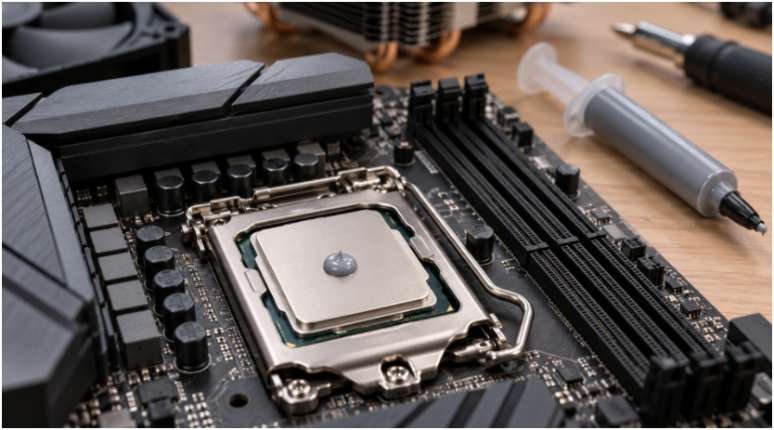
A perfect-looking paste pattern cannot rescue a loose cooler. When I choose a method, I first check the cooler’s instructions, then focus on clean surfaces and even mounting pressure. Those steps give a new build its best chance of running cool without wasting paste.
Thermal paste fills tiny gaps between the CPU’s metal lid and the cooler base. You need a thin layer across the contact area, not a thick cushion of paste. Intel recommends a small central amount for a typical installation, while cooler and paste makers also describe other workable patterns.
Which thermal paste pattern should you use?
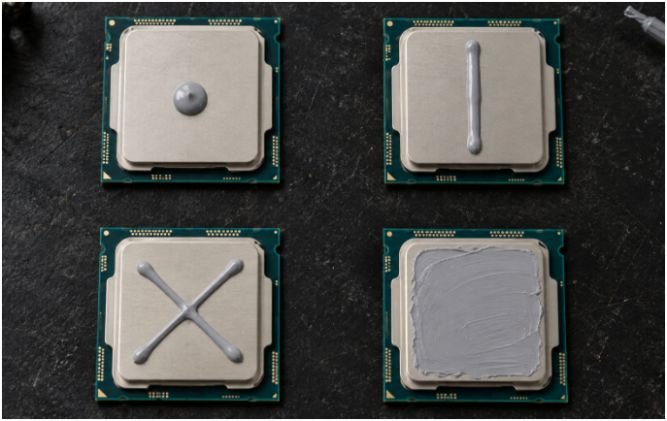
The best thermal paste application methods for CPU coolers depend on the CPU, paste, cooler base, and manufacturer’s instructions. Treat the table as a starting point rather than a rule for every socket.
| Method | Practical starting point | Main caution |
| Center dot | Many standard desktop CPUs; simple for a first installation | Too little paste may leave the outer contact area uncovered |
| Thin line | An option for a rectangular heat spreader | A wide line can push excess paste beyond the edge |
| Thin X | Larger lids or a product that specifically recommends it | Thick lines can create unnecessary overflow |
| Manual spread | When the paste or cooler maker calls for full visible coverage | An uneven or overly thick layer can hurt contact |
Center dot: the simplest starting point
For a standard desktop CPU without special application instructions, I would start with a small dot in the center. Lowering the cooler spreads it outward. Intel describes an amount roughly between a grain of rice and a pea; that is a guide, not a measurement you must hit exactly. If you remove the cooler to check coverage, clean both surfaces and apply fresh paste before reinstalling it.
Line and X: options for different contact areas
A thin central line offers another way to distribute paste along a rectangular lid. A thin X places paste across more of a large surface before mounting. Neither pattern automatically produces lower temperatures on every CPU.
Manufacturer guidance varies. AMD’s AM4 cooler instructions specify a thin X, while Intel’s general installation guide describes a central dot. That difference is a good reason to read the instructions for the hardware in front of you instead of choosing by socket shape alone.
Manual spread: useful when instructions call for it
A supplied applicator can help you make a thin, even layer on a large lid. ARCTIC accepts spreading as one application option. Intel advises letting cooler pressure spread the paste in its general guide, and Noctua says its NT-H1 and NT-H2 pastes generally do not need manual spreading. Follow the directions for your paste and cooler.
Prepare the CPU and cooler before applying paste
Check for pre-applied paste and protective film
Look at the cooler’s contact plate before opening your paste tube. Many new air coolers and all-in-one liquid coolers arrive with paste already applied. If yours does, do not add another layer. Remove any protective film according to the cooler instructions without touching the prepared surface.
Check the mounting kit as well. The right backplate, brackets, and standoffs allow the cooler to sit as intended. Keep the cooler manual nearby, especially if one kit supports several sockets. This applies to quiet CPU air coolers and water blocks used with liquid cooling loops. Replace those suggested internal paths with your published URLs.
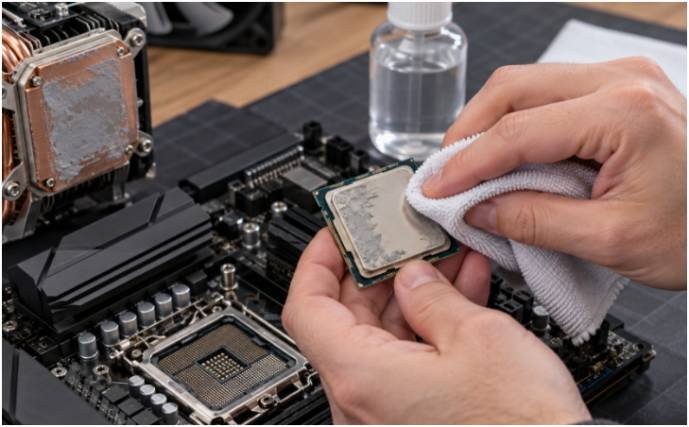
Clean old paste when reseating a cooler
Power down and disconnect the PC before removing the cooler. On an AM4 system, hardened paste can hold the CPU and heatsink together. AMD advises loosening that bond with a gentle twist before lifting; follow the removal directions for your specific socket and mount.
Remove old paste from both the CPU lid and cooler base. A lint-free cloth with isopropyl alcohol works; let the surfaces dry before applying fresh paste. High-purity alcohol is convenient, but 91% or 99% is not a universal requirement. Noctua also lists other cleaning options for its paste.
How to mount the cooler without spoiling the application
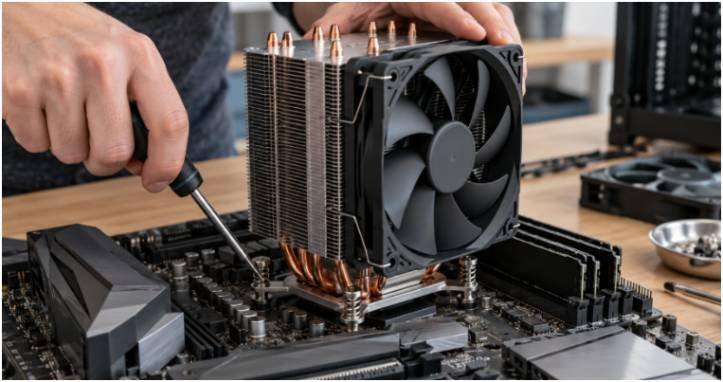
Place it once and tighten evenly
Apply the chosen amount to the CPU lid, then lower the cooler straight onto it. Hold the cooler steady while engaging the mounting hardware. For a four-screw mount, start every screw before tightening them gradually in a diagonal sequence. Intel and AMD both describe diagonal tightening for applicable mounts. Use the sequence and stopping point in your cooler’s manual; a clip-on mount works differently.
Avoid lifting the cooler after it contacts the paste. If you must remove it to correct the mount, clean both mating surfaces and start with fresh paste. Once installed, check for visible overflow and connect the cooler fan or pump as directed.
Use a repeatable temperature check
Before deciding the paste failed, I would note the CPU temperature at idle and during the same sustained task, with the same fan settings. Compare those readings with the CPU and cooler’s guidance. One brief temperature spike tells you less than a repeated pattern under load.
If temperatures climb immediately or performance drops sharply, check the mounting hardware, protective film, fan connection, and pump setup first. For an all-in-one cooler, confirm its pump connection and settings against the cooler and motherboard manuals.
Repasting should follow a clear reason, such as a disturbed mount or poor contact; it need not be the first response to every high reading.
Frequently asked questions
1. What is the best thermal paste pattern for an AM5 CPU?
Start with your paste and cooler instructions. A modest central application is a practical option for many standard desktop installations.
2. Should I use a line on an Intel LGA1700 CPU?
A thin line is an option, but it is not mandatory. Intel’s general guidance also describes a small central dot.
3. Can too much thermal paste damage a PC?
Excess paste can spill beyond the CPU lid. Keep the application modest and follow the paste maker’s handling guidance.
4. Do I need new paste every time I remove the cooler?
Yes. Clean the CPU and cooler base, then apply fresh paste before remounting.
Give the cooler a fair shot
I would choose the pattern I can apply neatly, follow the manufacturer’s instructions, and spend extra care on the mount. For your next installation, check for pre-applied paste and protective film before opening the tube. That small pause can save a full rebuild of the cooler mount.
Leave a Reply